Introduction to Desktop
Get to know your way around the Lead Companion Desktop version.
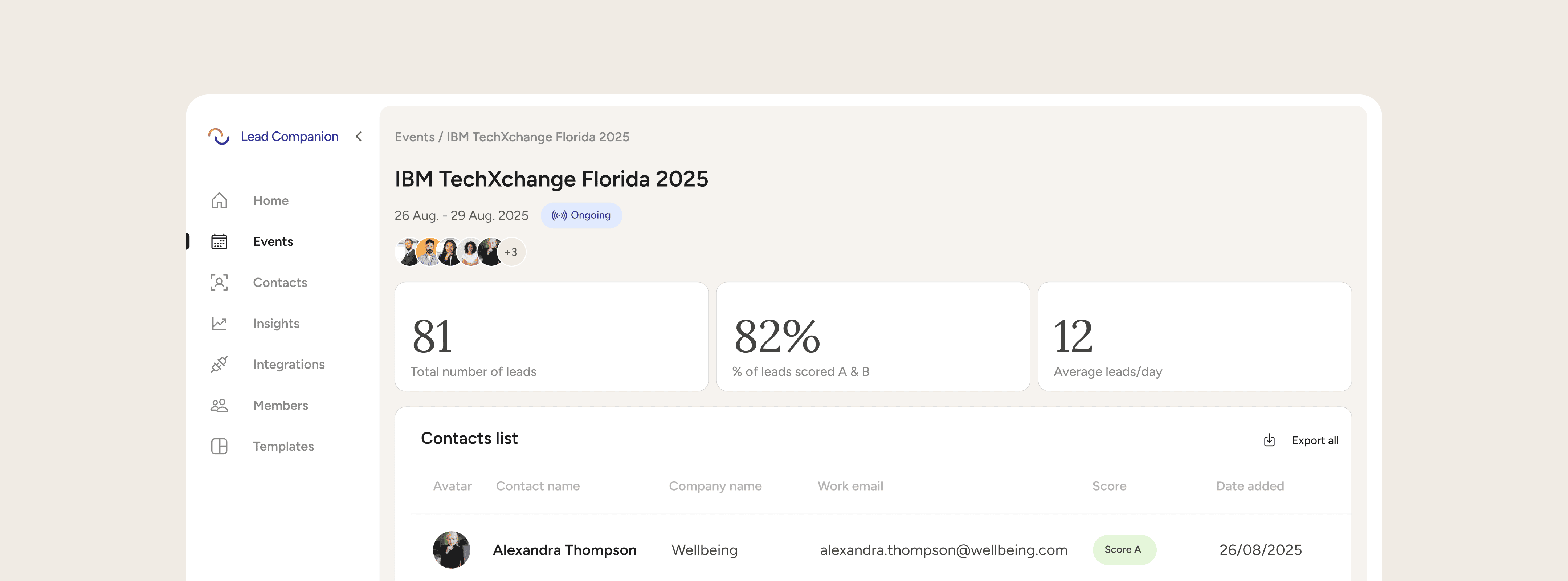
The workspace is divided into two main areas: the sidebar and the main panel. These will help you find your way around all functionalities and features.
Sidebar
The Lead Companion sidebar is your primary navigation tool, designed for clarity and efficiency. You can find it on the left side of your screen, where it organizes all major features into a single, accessible menu.
Each menu item is paired with an intuitive icon, making it easy to identify sections at a glance. The sidebar includes:
Home: Your dashboard and starting point for every session.
Events: Access and manage all your upcoming and past events.
Contacts: View and organize your event leads and connections.
Insights: (Coming soon) A dedicated space for analytics and performance metrics.
Integrations: (New) Connect Lead Companion to your favourite tools and CRMs.
Organization members: Manage your team and assign roles.
Templates: Quickly access reusable templates for ICPs and Qualifying Questions.
With clear color coding and labels for new or upcoming features, the sidebar keeps you oriented and streamlines your workflow—so you can move between event management, lead tracking, team collaboration, and integrations with just a click.
At the bottom left of the Lead Companion sidebar, you’ll find your personal profile icon—displaying your initials or profile picture alongside your name. This section serves as your quick access point for account-related actions, such as managing your profile, sending feedback, or logging out. With just a click, you can update your account settings, share suggestions with the Lead Companion team, or securely exit your workspace.
Main Panel
The main panel is where you create and manage your events, interact with your event contacts and do many other things in Lead Companion. Depending on the tab you’re on, you might see lists of upcoming events, contact profiles, or actionable insights to help you close deals faster.