Add your company ICP
Set up your ICP in Lead Companion.
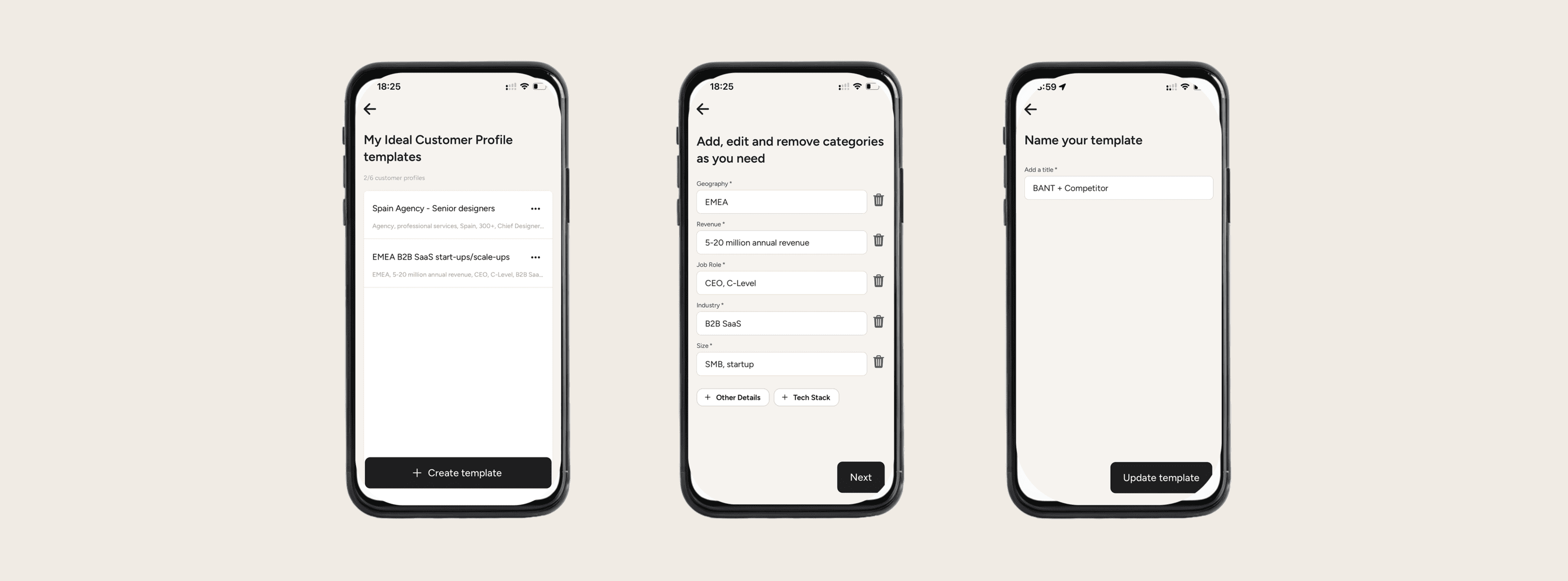
Every event has to have an ICP defined. Matching your leads to the ICP is how we assign a score to a lead.
What are qualifying questions?
An Ideal Customer Profile (ICP) describes the type of company that gets the most value from your product—and delivers the highest value back to your business. It typically includes firmographics (industry, size, region), business model, tech stack, pain points, and buying triggers.
Why is an ICP important?
A clear ICP helps your team focus outreach, qualify leads faster, and improve conversion rates. In lead generation software, your ICP guides filters, scoring models, and routing rules so the right prospects get prioritized.
A tightly defined Ideal Customer Profile (ICP) helps Lead Companion show the right signals and ignore noise. Map your ICP firmographics (industry, company size, region) and buying context (role/seniority, budget/timeline, other) into Lead Companion’s filters, enrichment, and qualifying questions.
Steps to take
Choose one of 2 options:
Select an existing ICP template → “edit” or “duplicate” it
Create a new ICP template from scratch
Add or edit ICP criteria in free text
AI will use it as free text context, be as specific as you want
Set or edit the name for your ICP template