Add qualifying questions
Set up the your qualifying questions in Lead Companion.
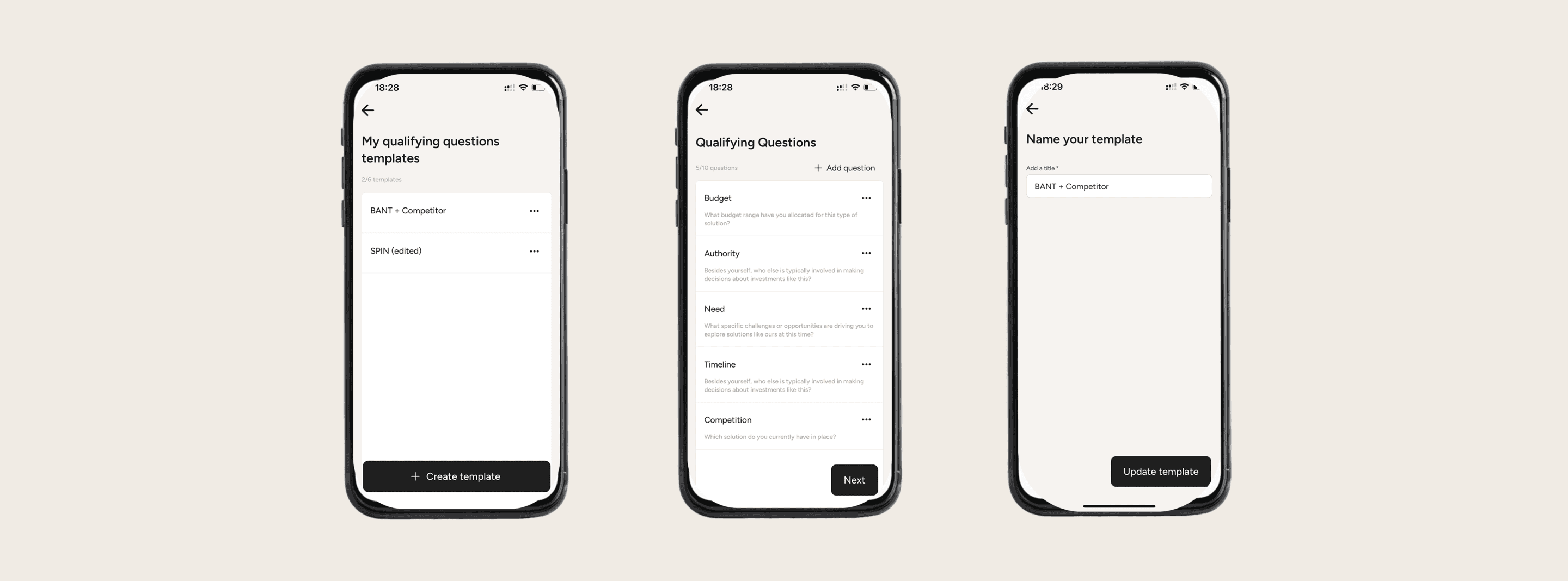
Qualifying quesitons are not mandatory but we highly recommend using them to document conversations with leads in a structured way.
What are qualifying questions?
Qualifying questions are the purposeful prompts booth staff use to assess whether a visitor matches your ideal customer profile and has meaningful buying intent. Done well, they shorten conversations, avoid wasted demos, and feed sales-ready leads into post-event workflows with clear next steps.
Why are qualifying questions important?
Interest alone doesn’t close deals. Qualifying Questions give you a clear, measurable way to separate window-shoppers from high-value leads, making follow-up faster and more effective.
Qualifying questions are important because they convert fleeting stand interactions into structured data that drives prioritization, speed, and ROI. Without them, teams collect business cards and anecdotes; with them, every conversation produces comparable signals—fit, authority, need, timing—that route hot leads to immediate meetings and park the rest in the right nurture.
When booth staff answer qualifying questions in Lead Companion, the structured responses give the AI consistent signals—fit, role, need, urgency, and next-step readiness. This labeled data lets the model weight what matters for your organisation, score leads more accurately, and surface the most relevant contacts to sales.
Steps to take
Choose one of 2 options:
Select an existing qualifying questions template → “edit” or “duplicate” it
Create a new qualifying questions template from scratch
Add or edit qualifying questions - for each question:
Add a Category (e.g. “Budget”)
Add the question that need to be answered
Set or edit the name for your qualifying questions template